
HDRI shadows too soft? Clipped vs unclipped sun explained
- A clipped HDRI stores the sun at a capped value, so the sun is far too weak compared to the sky and shadows come out soft and faint.
- An unclipped HDRI keeps the sun's real brightness and colour, which gives sharp shadows, warm direct light and bright glints in reflections.
- Lowering the exposure of an HDRI by several stops shows clipping: an unclipped sun shrinks to a small coloured disc, a clipped sun fades out with the clouds.
- Resolution does not fix clipping. A 4K unclipped sky casts sharper shadows than a 20K sky with a clipped sun.
- 34 outdoor skies on HDRI Hub are tagged unclipped, including night scenes with unclipped street lamps.
You load a sunny HDRI and the render looks like a dull, cloudy day: faint shadows, flat light, grey highlights on glass and car paint. Your software is usually not the problem. The sun in the file was clipped when it was captured, so it holds only a fraction of its real brightness. This page explains what clipping is, how to test any HDRI for it in two minutes, how to work around a clipped sun in Blender, Enscape, D5 Render and Twinmotion, and how to get softer shadows on purpose when you want them.
What does "clipped" mean in an HDRI?
An HDRI stores real brightness values, not just screen colours. In a clear midday sky the sun is several thousand times brighter than the sky next to it. That gap is what makes a sharp, dark shadow in a render: one tiny, very strong light against a much weaker dome of sky.
Clipping happens when the brightest part of the scene goes beyond what the capture recorded. Every pixel above that limit is stored at the same flat value, so the sun becomes a plateau instead of a peak. Its brightness drops to a fraction of the real value, and because all three colour channels hit the ceiling, its colour turns neutral white.
The cause sits in the capture. An HDRI is merged from a series of exposures. If even the darkest exposure was too bright for the sun, no frame holds its true value, and the merge cannot recover it.
Street lamps and spotlights in night or interior panoramas clip the same way. A clipped sodium lamp loses its orange and gives a pale, neutral glow.
A JPEG panorama is the extreme case. Eight bits per channel have no values above white, so every light source is clipped by definition. That is why a preview image used as an environment gives flat light and no shadows, see HDR vs EXR.
What clipping does to your render
A clipped sun still sits in the right place. The problem is balance: the sky is recorded correctly, the sun is not, so the sky now delivers most of the light.
- Shadows: soft, faint and low in contrast. In bad cases the scene looks overcast even though the panorama shows a blue sky.
- Overall colour: cooler and bluer than it should be, because blue skylight outweighs the warm direct sun.
- Highlights: car paint, glass and chrome show a dull grey or white spot where a hot, bright sun glint should be.
- Light colour: clipped suns and lamps turn white, so sunsets and street lights lose their saturation.
- Sun detection: engines that place their own sun at the brightest pixel can pick a bright cloud edge or a reflection instead of the sun, if the clipped sun is not clearly the brightest point.
Resolution does not fix any of this. A 4K map with an unclipped sun lights a scene better than a 20K map with a clipped one, see the HDRI resolution guide.
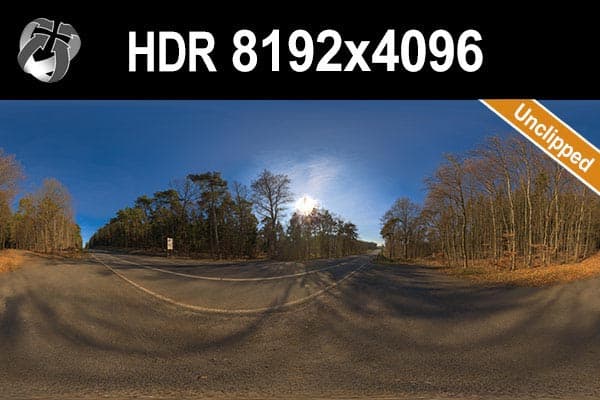
HDR 145 Rural Road Clear Sky is a typical unclipped sky: a clear sun disc low over a forest road.
How to test any HDRI for clipping
Two checks take a couple of minutes and work on any HDRI, free or paid.
The exposure-down test
- Open the .hdr or .exr file in a viewer that reads floating point data: Photoshop in 32-bit mode, Affinity Photo, or Blender's Image Editor.
- Lower the exposure in large steps, several stops at a time.
- Watch the sun. In an unclipped file the bright area shrinks into a small, round disc that keeps a warm colour, and the rest of the image goes black long before the sun does.
- In a clipped file the sun turns into a flat grey blob at the same time as the brightest clouds, and it never resolves into a disc.
The render test
Build a small test scene: a plane, a matte grey sphere, a chrome sphere and a white cube. Light it with the HDRI only, no lamps, at default strength. Then look at three things:
- Shadow edge under the cube: dark with a defined edge means a strong sun. A faint, blurred patch means a weak or clipped sun.
- Chrome sphere: an unclipped sun shows as a tiny, very bright point. A clipped sun shows as a white smudge no brighter than the clouds around it.
Symptom, cause and fix at a glance
| Symptom | Likely cause | Fix |
|---|---|---|
| Faint, blurry shadows under a blue sky | Sun clipped in capture | Use an unclipped HDRI or add an aligned sun light |
| No sun shadow at all in EEVEE | World sun extraction off or threshold too high | Set a Threshold above zero in the World Sun panel, enable Use Shadow |
| Two shadows in different directions | Engine sun added on top of an unclipped HDRI sun | Turn off the extra sun, or align it and lower the HDRI |
| Engine sun points at a cloud | Clipped sun is not the brightest pixel | Use an unclipped sky or set the sun direction by hand |
| Grey, dull highlights on car paint | Clipped sun has no real peak to reflect | Use an unclipped HDRI; a sun lamp does not fix reflections |
| Scene looks too blue | Sky outweighs the clipped sun | Unclipped HDRI, or a warm sun light aligned to the HDRI |
| Fireflies around a bright sun | Glossy and caustic paths hitting the sun | Clamp indirect light, keep world importance sampling on |
How to fix weak HDRI shadows in your renderer
Best fix: use an unclipped HDRI
An unclipped file carries the sun's direction, intensity, colour and size in one map. Shadows, reflections and colour come from the same source, so they match, with no extra lights to align. HDRI Hub has 34 outdoor skies tagged unclipped, collected on the unclipped HDRI page.
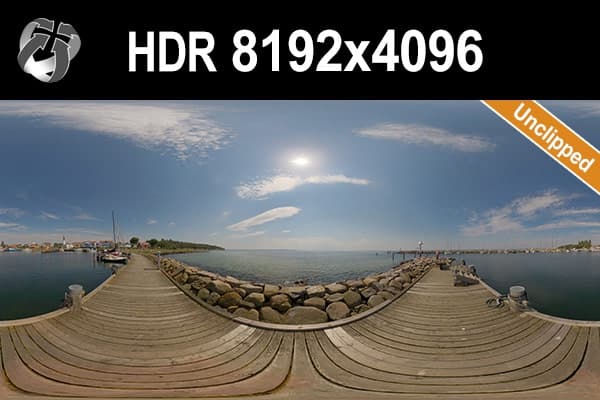
HDR 168 Sea Harbor Sunny puts the sun high above open water: short, hard shadows and strong glints.
Clipped HDRI: add a sun light
If you have to stay with a clipped HDRI, add a directional light to replace the missing sun:
- Add a Sun light in Blender, a V-Ray Sun or Corona Sun, or a directional light in your engine.
- Rotate it until its shadow matches the sun in the panorama, then rotate light and HDRI together.
- Lower the HDRI strength a little, because the sky now only fills.
- Warm up the sun colour slightly to balance the blue sky.
The limit shows in reflections. Glossy surfaces still mirror the dull clipped sun, while the shadows come from the lamp. On a car or glass facade the mismatch is visible.
If the HDRI is unclipped, do the opposite: switch the extra sun off. Two suns produce two shadows and an overexposed scene.
Contrast tricks
A power curve on the environment map lifts bright parts more than dark ones, so shadows look stronger. In Blender, put a Gamma node with a value above 1 between the Environment Texture and the Background node. In Corona, a Color Correct map with a gamma below 1 does the same. This is an approximation: it changes the whole map and cannot restore lost colour.
Blender EEVEE (4.2 and later)
EEVEE stores world lighting in a light probe, which alone cannot produce a sharp sun shadow. Since Blender 4.2, the World properties have a Sun panel that turns the brightest part of the HDRI into a real sun light:
- Threshold: world light above this value is taken out of the probe and turned into a sun light. Zero disables extraction.
- Angle: the angular diameter of the extracted sun. Larger values give softer shadows.
- Use Shadow: lets the extracted sun cast shadows.
Extraction needs a sun far brighter than the sky. With an unclipped sun, most direct light lands in the extracted sun and the shadow is sharp. With a clipped sun little light passes the threshold, and the shadow stays weak. More setup steps are in the Blender HDRI lighting guide.
Blender Cycles: noise near a bright sun
Cycles traces the HDRI sun directly, so an unclipped map needs no extra settings. Keep World Sampling on Auto, which enables importance sampling. Fireflies usually come from glossy bounces and caustics: clamp Indirect Light under Light Paths, not Direct Light, which also dims the real sun.
Enscape
Enscape lights the scene with its own sun. In the skybox settings, Brightest Point as Sun Direction moves that sun to the brightest spot in the HDRI. With an unclipped sky that spot is the sun disc. With a clipped sky it may be a cloud, and the shadows point the wrong way. Enscape 4.19 and later load .exr skyboxes directly. Version 4.18 LTS and earlier need the .hdr format, so convert our OpenEXR skies there. Details are in the Enscape HDRI guide.
D5 Render
D5's help center warns that a custom sun on top of an HDRI that already has a sun creates a double shadow. With a sunny HDRI, enable Follow HDRI so the sun's altitude and azimuth follow the sun in the map, and rotate the HDRI to move it. Use Custom Sun only when the HDRI has no clear sun, such as a clipped or overcast file.
Twinmotion
In HDRI mode, Twinmotion (2024.1.1 and later) offers a Directional light with a Match HDRI option. When enabled, it sets the light's intensity, rotation, colour and disk size from the HDRI, and the light follows when you rotate the map. A clearly defined, unclipped sun gives Match HDRI a sharp reference. Use a 2:1 equirectangular HDR file, see the Twinmotion HDRI guide.
When you want softer HDRI shadows
Sometimes soft shadows are the goal, for a calm residential exterior or an interior with diffuse daylight.
- Pick a different sky. An overcast or partly cloudy HDRI with the sun behind clouds gives soft, even light with correct colour. Browse the cloudy sky HDRIs.
- EEVEE: raise the Angle of the extracted world sun.
- Enscape: lower Shadow Sharpness in the Atmosphere tab of the visual settings.
- D5: with Custom Sun, increase Sun Disk Radius.
- Twinmotion: turn Match HDRI off and raise the directional light's Size.
- Cycles, V-Ray and Corona: the sun's size is part of the map, so you cannot widen it with a slider. Lower the HDRI strength and add a large area light as soft key, or switch to a cloudy sky.
Blurring an unclipped HDRI is a poor trade. It smears the sun across the sky and ruins the background.
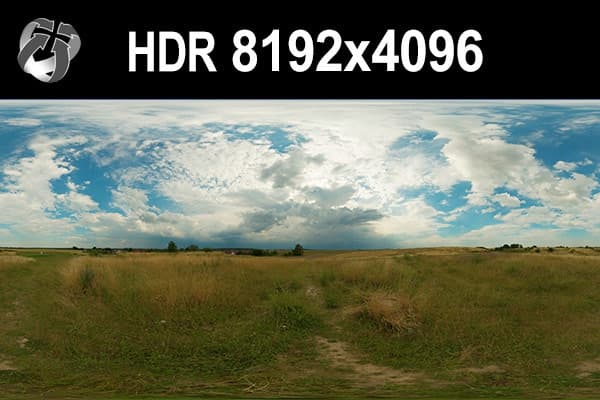
HDR 160 Cloudy Sky keeps the sun behind thick cloud: soft light that still has a direction.
Disabling HDRI shadows in Blender
To keep the HDRI visible but light the scene another way, mix two Background shaders with the Is Camera Ray output of a Light Path node. The camera sees the HDRI, the light comes from the second background or from lamps. The Blender 5.2 manual also lists a Cast Shadow option in the World Settings panel for Cycles, which stops the world from casting shadows.
Unclipped night skies
In a night panorama the light sources are street lamps and lit windows. Recorded unclipped, they keep their colour and act as real, small lights in the render.
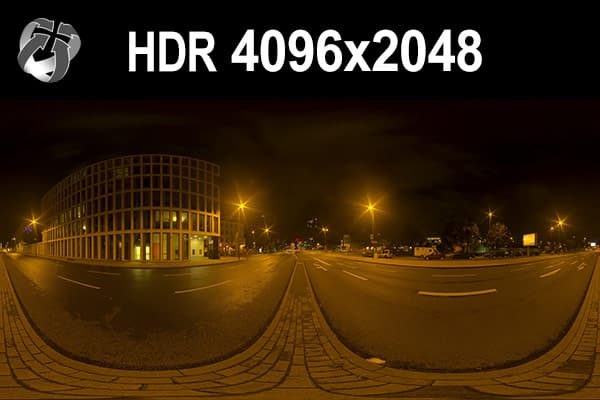
HDR 171 City Road Night and HDR 169 Entrance Garage Night are tagged unclipped for this reason.
Where to find unclipped skies
If the sun or the lamps drive your lighting, start with the unclipped collection. For sun height and backplates, see how to choose an HDRI and how to match an HDRI and backplate.
Frequently asked questions
What is an unclipped HDRI?
An unclipped HDRI records the sun and other bright lights at their real brightness and colour, without cutting them off at a maximum value. The sun stays a small, very bright disc, so it casts sharp shadows and correct highlights.
Why does my HDRI not cast sharp shadows?
The most common reason is a clipped sun, which is too weak compared to the sky. Other reasons are an overcast sky with no visible sun, or EEVEE with world sun extraction switched off. Run the exposure-down test to see which case you have.
How do I know if an HDRI is clipped?
Open the file in Photoshop in 32-bit mode, Affinity Photo or Blender's Image Editor and lower the exposure by several stops. An unclipped sun shrinks into a small coloured disc while the clouds go dark. A clipped sun fades out together with the clouds as a grey blob.
Do I need a sun light with an HDRI?
Not with an unclipped HDRI, which already contains the sun. Adding one creates a second shadow. With a clipped HDRI, an aligned sun light restores shadows, but reflections still show the dull clipped sun.
How do I soften HDRI shadows?
Use a cloudy HDRI, raise the world sun Angle in EEVEE, lower Shadow Sharpness in Enscape, increase Sun Disk Radius in D5, or raise the directional light Size in Twinmotion. Avoid blurring the HDRI.
Does a higher resolution HDRI give sharper shadows?
No. Shadow sharpness depends on the size of the sun disc and on whether it was clipped, not on pixel count. A 4K unclipped sky casts sharper and more accurate shadows than a 20K sky with a clipped sun.
Do unclipped HDRIs render slower?
They can need more samples around the sun, because a small, very bright light is harder to resolve without noise. Importance sampling in path tracers such as Cycles favours the sun and keeps the extra cost small.
Are all HDRI Hub skies unclipped?
No. 34 outdoor skies are tagged unclipped, including sunny day skies and night scenes with street lamps. The unclipped collection lists all of them, and the tag is shown on each product page.
Sources
- Blender Manual: EEVEE World Settings (Sun: Threshold, Angle, Use Shadow)
- Blender Manual: Cycles World Settings (Sampling, Cast Shadow)
- Blender Manual: Cycles Light Paths (Clamping)
- Chaos Docs: Enscape for SketchUp, Skybox as Background
- D5 Render Docs: Environment, Effects
- D5 Render Docs: Other common issues (Follow HDRI)
- Epic Games: Twinmotion Ambience settings
- Epic Games: Twinmotion 2025.1 release notes